Invest in good headphones
When you’re working away from home or the office, small things can make a big difference when it comes to productivity. I tend to work from home most of the time, but sometimes I’ll go to a coffee shop for a change of scenery. When I’m anywhere with background noise though, I find it virtually impossible to concentrate fully without wearing headphones. I’ve had a pair of Bose QuietComfort headphones for the past three years and can honestly say that they’re amazing. Admittedly they’re not cheap, but you get what you pay for; the quality of the noise cancellation is incredible, they’re well built, hold their charge for hours (long enough for a flight to the UK) and they come with a good protective case. Genuinely one of the best things I’ve ever bought. Find them on Amazon here.
Bonus tip - I use brain.fm all the time while working. It’s a music player specially designed to help you focus. I love it because; one, sometimes I just don’t know what to listen to on Spotify; two; most of the tracks have the perfect frequencies to drown out background noise; and three, maybe its a placebo effect but I genuinely think there’s something special about the sounds that help me focus better than when I just listen to regular music. Get a one month free trial with this referral link.
Get a phone contract with a lot of data!
If there’s one thing that’s critical to working remotely, it’s a decent internet connection. I’ve found the speed and quality of wifi connections in hotels, cafes and the like in Australia tend to be pretty rubbish, and so never rely on them. Instead, I have a mobile contract with unlimited data (or at least more than you’re likely to need). I’ve used Amaysim since I settled in Australia and have always found it to be good. I use their Unlimited 45gb plan which costs $40 a month and also includes free international calls (great for when I need to call home). Use this link to get $10 of free credit.
Be honest with your boss
I’m a terrible liar so this isn’t really optional for me, but if you’re going to head away from home to work for long periods of time you really need to let your boss know. It’s inevitable that there’ll be times when you won’t have internet access, or your laptop battery will die or you’ll get stuck in traffic on the way back from a morning surf - which could all stop you from dialling in to a meeting or responding to a message on Slack, and thus lead to awkward questions.
I’m lucky to be working for an amazing company that has embraced remote working and really trusts its employees to get their work done; but it’s all based on trust. I catch up with my manager via Zoom at least twice a week, let him know where in the world I am, what I did last week and what’s on my to-do list for the coming week.
Be realistic about where you can be productive
Don’t believe the hype about digital nomads laying around in hammocks with their Macbook in one hand and a pina colada in the other: It’s bullshit. For one, you’ll get a terrible back ache after a very short space of time; and two, it’s impossible to see a laptop screen in bright sunlight. You need to be realistic about the type of environment in which you’ll be able to be productive.
Everyone’s different, and while some lucky people can work and be productive in a noisy and distracting environment with their laptop perched on a tiny table, I am not.
I really like working in coworking spaces when I’m travelling because - as with working in a regular office - they give the sense of separation from being at home and provide a more distraction-free environment. In Australia though, the cost can be prohibitive, especially for longer periods of time. You can expect to pay around $500 per month for a decent coworking space, which is way beyond my budget. Instead, I prefer to set up the best work environment I can wherever I am staying.
Create a good working environment

Okay, it’s unlikely that you’re going to be able to carry a deluxe ergonomic chair around with you, but it’s worth spending some time setting up a workstation that’s comfortable and will allow you to be productive.
Space is an important factor, so when deciding on somewhere to stay, think about where you can work.
In my current adventures in Australia I’m travelling by car so have enough space to bring my monitor - which I’d highly recommend if possible. A lot of my work involves analysing datasets in Excel which is quite tricky with just my laptop screen, and definitely affects my productivity. I also have a folding laptop stand that is light, strong and sturdy and would highly recommend. You can buy it from Amazon here.
I’ve also been carrying around a portable camping table (see photo above) which has been really useful when my girlfriend and I need to work in the same place (we’ll take turns between using the ‘desk’ and dining table).
I also recommend bringing a couple of cushions with you (one to actually sit on, and another smaller one to act as a lumbar support). It can really make a difference to your posture and comfort when you’re sitting for long periods on dining table chairs.
Extension leads and powerboards are essential! Bring at least a couple each so that you can set up your work station in the best spot.
Use a schedule - and be disciplined
One of the most difficult things about working remotely is being disciplined about work. When Mecha and I were in Byron bay, we’d look at the surf cams and be tempted to head out whenever it looked good, but this definitely affected our productivity. Being British, I have an intrinsic desire to make the most of every second of sunlight in case it disappears any moment (not much danger of that up here in Noosa) so I find it difficult to sit inside when it’s a beautiful day. As I mentioned above, though it’s important to be realistic about where you can be productive - and sitting outside in the sun isn’t ideal.
We’re now being much more disciplined about how we spend our time. We have three potential schedules depending on how the surf looks. Here’s an example:
6am - Wake up, check the surf cams. Coffee and breakfast (if not surfing)
6.30 - If the surf is good, we’ll be surfing if not we’ll have started work
9am - If we went for a surf, we’ll be back home and working by this time
1pm - Stop for lunch. Sit in the sun for a while or go for a walk and get a coffee
2pm - If we didn’t surf in the morning, we’ll check again now. If it’s good we’ll go. Otherwise we’ll go back to work.
4.30pm - If we went surfing at 2pm, we’ll be back home working again by now. If we went surfing in the morning, or not at all, we’ll be finished for the day.
6pm - If we went surfing in the arvo, we’ll probably finish around this time
7pm - Dinner
Keep your things organised
Let’s be honest, moving your stuff around every few weeks (or less) is a pain in the ass. But you can make it much easier by keeping organised so that you don’t need to sort everything each time you head to a new place. Because we’re travelling by car, Mecha are carrying quite a lot of stuff around (monitors, the camping ‘desk’, surfing stuff, yoga stuff, Mecha’s extensive clothing collection ;)) but we try to make sure that everything has a place.
We keep foods like spices, herbs (and all those other little bags and jars you accumulate) in shoeboxes that we can lift in and out of kitchen cupboards easily. We have a similar box for toiletries. Wetsuits, beach towels and sunscreen are always kept in a readily accessible box in the car.
Seek out good deals for accomodation
It’s been a tough year for the Australian tourism industry, but that has created opportunities for people like us who are looking for long term accommodation at an affordable price.
The first place we stayed in Byron (we booked at the height of the covid lockdown when prices were probably at their lowest) is currently listed on booking.com for nearly $2,000 per week. We paid the same amount for the whole month. We paid only slightly more for the second place, but still far less than the going rate.
The single best piece of advice I can give is to contact places directly. Websites like Booking.com take a big chunk of the price you pay when you book through them, and the prices tend to only be set up for shorter-term stays, so you’ll nearly always get a better deal if you go direct.
This can be time consuming however, especially in places where there’s hundreds of holiday apartments to contact. That’s why Mecha and I built a script to scrape the search results for a term (in our case ‘holiday apartments Noosa’) and extract all the email addresses from those websites. We then emailed everyone in one time and watched the offers roll in. Sign up to our mailing list to hear when we post our next article with exactly how we did it, including the script itself, and the email we sent out to enquire about places.
Got any tips or questions about being a digital nomad in Australia? Leave them in the comments below!
Use the simple tool below to reformat tables from ChatGPT and copy and paste them into Word or Google Docs. Simply paste the output from ChatGPT into the field below and click the button to generate the result.
Format ChatGPT Tables for Easy Copying into Docs
Are you looking to copy a table generated by ChatGPT into Google Docs or Microsoft Word, but struggling with the formatting? Our simple tool is here to help! Just paste the ChatGPT-generated table into the field below and click the "Convert" button. The tool will transform the table into a user-friendly format that you can effortlessly copy and paste into your documents.
How It Works
- Paste the ChatGPT table into the input field.
- Click the "Convert" button.
- Copy the reformatted table and paste it into your preferred document editor.
Make your data transfer seamless and efficient with our ChatGPT Table Converter for Word. No more tedious formatting adjustments – get your table ready for your documents in just a few clicks!
Table Formatting Made Easy
The ChatGPT-generated tables are often in a pipe-delimited format, which isn't directly compatible with document editors. Our tool takes care of the conversion process, ensuring your table maintains its structure and readability when copied into Google Docs, Microsoft Word, and similar applications.
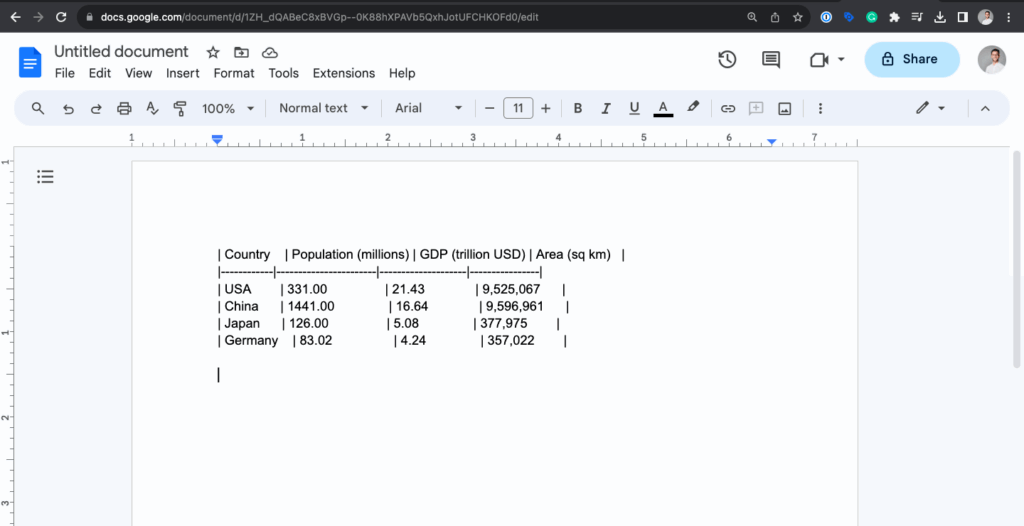
Why Choose Our Tool?
- Effortlessly reformat ChatGPT-generated tables.
- Eliminate manual formatting errors.
- Compatible with popular document editors.
- User-friendly and intuitive interface.
Don't let formatting challenges hinder your workflow. Try our ChatGPT Table Converter today and experience seamless table copying like never before!
Use the simple tool below to reformat tables from ChatGPT in a way that allows you to copy and paste it back into Excel or Google Sheets. Simply paste the output from ChatGPT into the field below and click the button to generate the result.
Make sure to remove any lines of text that could appear at the beginning of the table.
Format ChatGPT tables with this simple tool
Are you trying to copy a table from ChatGPT into Google Sheets or Microsoft Excel and ending up with something that looks like this:
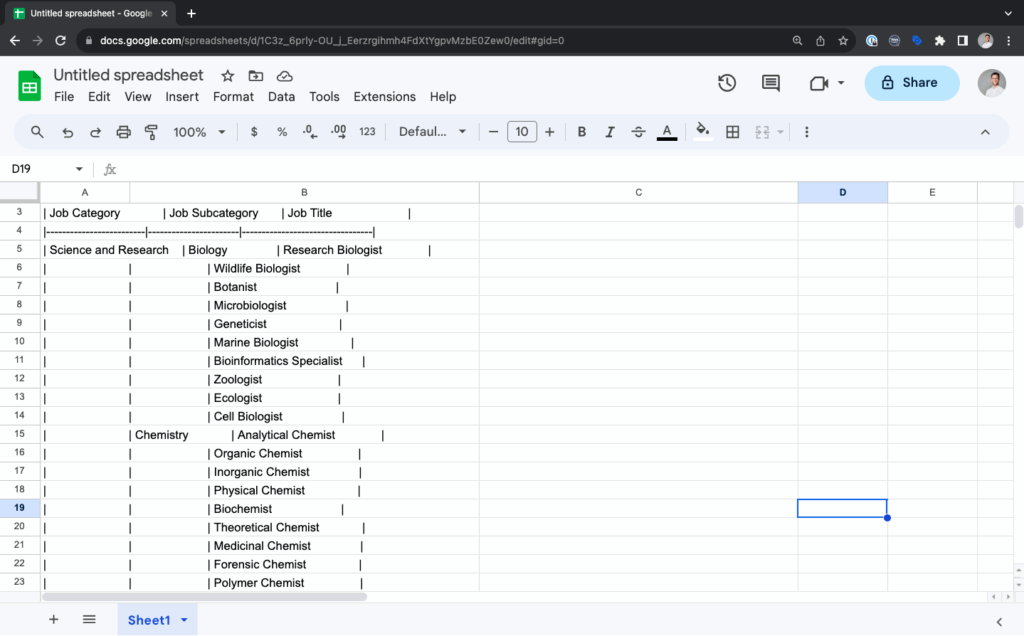
If so, this tool is the perfect solution. Simply copy the output from ChatGPT into the field at the top of the page and click the 'convert' button. The re-formatted table will be generated below. You can either highlight it manually and copy, or click the 'copy' button. Then head over to your spreadsheet tool and copy it into the cell you want, it's that easy!
I hope you find the tool useful!
ChatGPT Table Format: Pipe-Delimited Tables
ChatGPT tables look something like this:
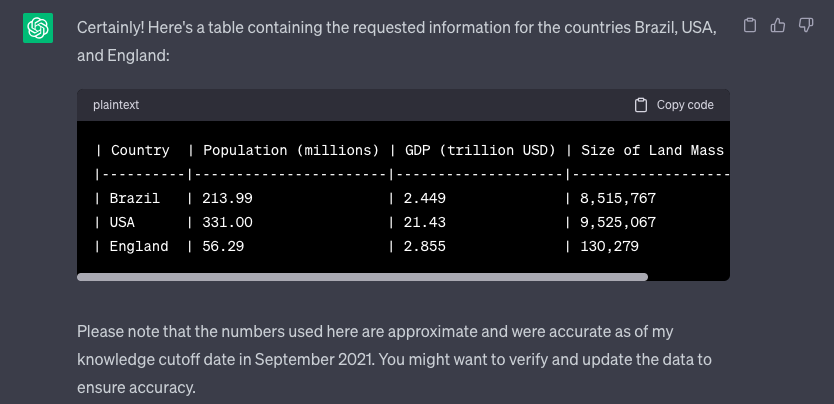
This format is called a pipe-delimited table. It uses vertical bars (pipes) to separate columns and hyphens to denote column headers and row dividers. Each row represents a record, and each cell within a row contains specific data.
Usage and Advantages
Pipe-delimited tables are easy to read and write in plain text, making them a popular choice for formatting data within web page content. They provide a structured layout for presenting information in a clean and organised manner, making it especially useful for conveying tabular data in documentation, tutorials, and technical articles.
Why They Can't Be Directly Copied into Google Sheets
While pipe-delimited tables are suitable for displaying data on web pages, they cannot be directly copied and pasted into Google Sheets as they use a different formatting structure. Google Sheets expects data to be organised in a tabular format with cells separated by tabs or commas and rows separated by line breaks.
Attempting to paste a pipe-delimited table directly into Google Sheets may result in a single cell containing all the data, rendering it unreadable and unmanageable. Fortunately, this tool will help you to easily copy and paste data into Google Sheets or any other spreadsheet software.
Table Formats Compatible with Google Sheets
To successfully copy data into Google Sheets, use one of the following formats:
- Comma-Delimited (CSV): In this format, columns are separated by commas, and rows are separated by line breaks. It's the most widely recognized format for importing data into spreadsheets.
- Tab-Delimited: Similar to CSV, but columns are separated by tabs instead of commas. This format is suitable for pasting data directly from a text editor or table generator. This is the format outputted by the tool above.
- HTML Tables: If you're copying data from a web page, you can often copy and paste an HTML table directly into Google Sheets, preserving its structure.
Despite not always being hugely useful for website users, the presence long-form content on web pages continues to play an important role in determining SEO rankings. However, producing this content at the scale required for large websites has traditionally been very expensive. Often, websites will choose to produce copy for only the pages that target the highest volume keywords, but this could potentially mean missing out on significant gains from long-tail keywords.
Nowadays ChatGPT has made it fast and incredibly cheap to produce reasonably high-quality SEO content, but the chat interface that you're probably familiar with isn't that useful when you need to create content for hundreds or thousands of pages. That's where the ChatGPT API comes in.
In this article I will provide a few examples of what I mean by long-form SEO content. Then I will show you how use Python, the ChatGPT API, and Google Colab to generate content at scale and supercharge your programmatic SEO strategy.
What is long-form SEO content?
By 'long form content', I am referring to any copy on a page that is longer than a sentence or two, and whose primary purpose is to improve SEO. Essentially, this copy is providing an opportunity to add relevant keywords to the page, allowing Google to build a better understanding about the purpose of the page, and the user intents that it serves.
How Important is long-form content for SEO?
I have a few first-hand experiences that demonstrate the SEO impact that adding SEO content to landing pages can have.
Experience #1 : Canva
One of the projects I led during my time as international SEO lead at Canva was the launch of the 'templates marketplace' in a number of international locales. In the screenshot below you can see an example of the long-form SEO content on the Business Cards templates page.
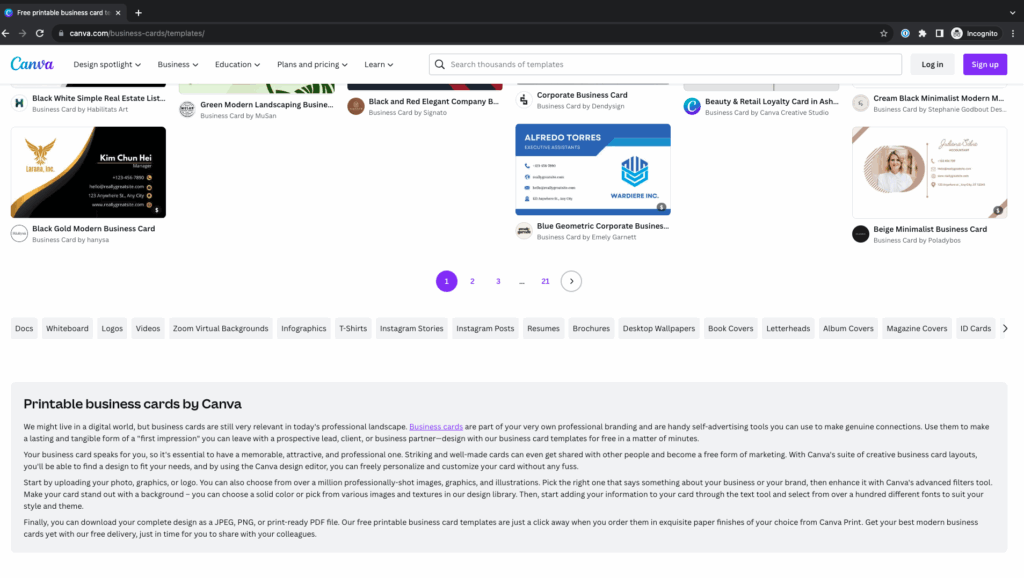
When we launched this site section in new locales, we translated everything from the English version of the page into the target language using a third-party translation vendor. This was expensive and time-consuming, so the question arose as to whether we should bother doing it at all; especially for the smaller markets like Poland or The Netherlands. After running a few tests however, it became clear that the text did play a role in helping to boost rankings, particularly for the more competitive keywords.
Experience #2 : Uber Car Share
The screenshot below shows another example of some SEO content this time on the Uber Car Share website. I worked as SEO lead for the company shortly before they were acquired by Uber, and managed a large project to completely overhaul the website which resulted in a more-than-doubling of organic traffic, and top-3 rankings for all the most important keywords like 'car hire sydney' etc. Whilst there were many optimisations made to the site structure, internal linking and performance, I believe that the long-form content on each of the landing pages was also an important factor that led to the amazing results.
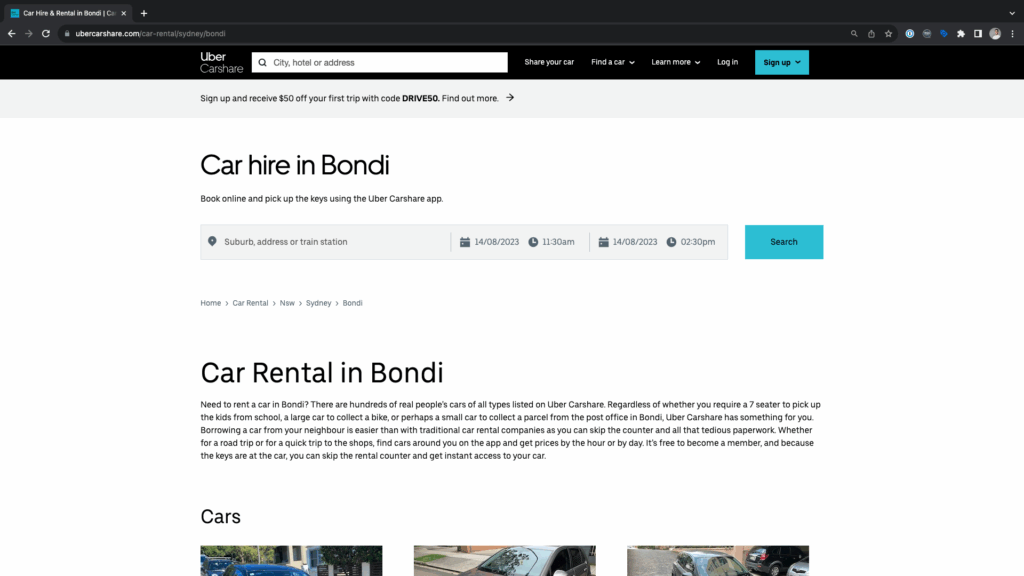
The approach I took to creating the content involved using a large spreadsheet with columns containing synonyms or alternative phrases and then using a formula to concatenate them in various ways. There were a few disadvantages to this approach:
- Phrases and parts of sentences were repeated frequently across all the pages, eg. it wasn't completely unique
- I wasn't able to incorporate any specific details that would help to improve the relevancy of the page in the eyes of Google, for example, mentioning certain landmarks or places of interest within each location
- The content was bland and uninteresting
- It was fairly time-consuming to create the spreadsheet and work out how to use formulas to get the desired results
Fortunately, all of these problems can be overcome by using the ChatGPT API.
Experience #3 : E-commerce
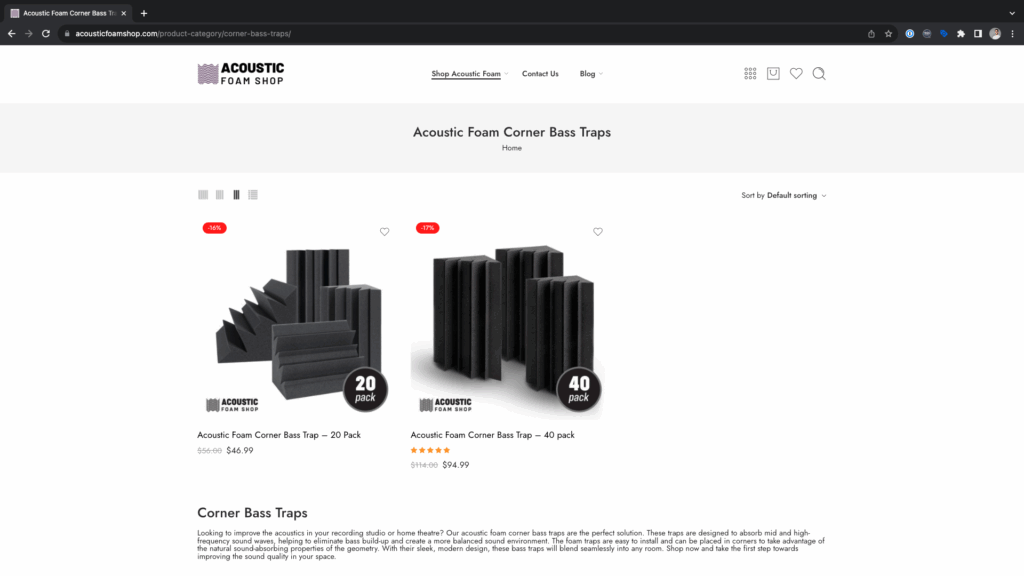
A final example is from an e-commerce dropshipping website that I use to test SEO ideas, Acoustic Foam Shop. The screenshot below shows an example of a category page where I added a paragraph of copy that was written by ChatGPT. Whilst the site doesn't get much organic traffic overall, I did see an uptick in Search Console impressions after adding the content to the category pages.
How much does it cost to use the ChatGPT API
The cost of using ChatGPT to generate content depends upon:
- The amount of information you provide in the prompt. For example, if you have a lengthy prompt containing examples for the model to follow when generating a response, the cost will be higher than if you provide a short prompt like; 'write me an seo paragraph about car hire in sydney'.
- The length of the response that is generated.
I'm not going to go into any more details here because quite frankly, this isn't my area of expertise. What I can say however, is that in my experience of using the tool, it is very cheap. We're talking a few cents for every dozen or so paragraphs that are generated.
As long as you don't mistakenly generate thousands of pieces of content at a time (which is very possible if you don't know what you're doing!) then you don't need to worry about costs.
Whether you know what you're doing or not, it's wise to set monthly usage limits that will prevent any unexpectedly huge bills.
Instructions
Setup the API key
You'll need to have a ChatGPT account and have set up billing information. Then you can setup the API key here. Copy and paste the details somewhere safe for you to use later.
Setup the Google Colab file
To keep things simple, I have supplied the code for you to run in this Google Colab file. You will need to make a copy of the file and add your own API key in order for it to work.
Adapt the code as required
In the example, I am generating content for two pages on the Uber Car Share website, one for 'car hire bondi beach', and another for 'car hire melbourne', but the function could be applied to a much larger list of locations.
First I define a function that contains the following:
A conversation prompt
Within this there are two sections:
- A 'system' prompt. This is where we provide context to chatGPT.
- A 'user' prompt, where we provide the location that we want ChatGPT to write about.
It took some time to get my head around system and user prompts. I recommend reading the examples contained in the best practices guide on the chatgpt website if you want to understand more about how they work.
Prompt design and engineering is a whole field in itself, and one that I am still learning. The prompt below led to good results for me for this task, but they could almost certainly be improved with experimentation. A few key best practices that I've learnt and used in the example below are:
- Providing context by telling ChatGPT to adopt a persona ('you are an SEO specialist...')
- Using short and concise language - it's easier for the model to understand, and cheaper!
- Provide examples
- Use formatting such as numbered lists, line breaks, and delimiting longer pieces of content (I used double square brackets to contain the examples)
def gpt_copy_generation(location):

    conversation = [
    {"role": "system",
     "content":
    """
    You are an SEO specialist writing content for an australian company that provides vehicle hire services called Uber Car Share.

    You will be provided with the name of a location within australia.

    You should return some copy to be used as a page introduction. It should help improve the page's SEO performance for keywords like 'car hire in sydney', van rental in melbourne'. Follow these guidelines:

    1. The text should be between 1000-1400 characters
    2. The text should make specific references to the location and places or landmarks that are there.
    3. The text should contain a variety of terms that relate to the topic, for example 'car share', 'car rental', 'car hire' etc.

    Here are two examples, enclosed within double square brackets:

    [[
    location: Parramatta

    "Looking for a car hire in Parramatta? Uber Carshare is your answer. We offer a range of vehicles to suit your needs, whether you're planning a family trip to the Parramatta Park, need a spacious car for a bike ride along the Parramatta River, or a compact car for quick errands around Westfield Parramatta.

    Uber Carshare stands out from traditional car hire services. With us, you can skip the queues and the paperwork. Simply find cars near you using our app, view prices by the hour or by the day, and get almost instant access to your chosen vehicle. It's free to become a member, and the keys are always at the car when you book an Instant Keys car, ready for your journey.

    Our car hire service in Parramatta is not only convenient but also cost-effective. With Uber Carshare, you only pay for what you need. Rent by the hour, day, week, or longer. All trips include fuel, damage cover, and 24/7 roadside assistance.

    Renting a car in Parramatta has never been easier. With hundreds of cars owned by locals, you can find a vehicle parked on your street or near the Parramatta Train Station. So why wait? Join us for free today and experience the convenience and affordability of Uber Carshare's car hire in Parramatta."
    ]]
    [[
    location: south melbourne

    "Are you in need of a car hire in South Melbourne? Uber Carshare is here to assist. We offer a variety of vehicles to cater to your specific needs, whether you're planning a family trip to the nearby Royal Botanic Gardens, need a spacious car for a bike ride along the Yarra River, or a compact car for quick errands around the South Melbourne Market.

    Uber Carshare offers a more convenient alternative to traditional car hire services. With us, you can bypass the queues and the paperwork. Simply locate cars near you using our app, view prices by the hour or by the day, and gain almost instant access to your chosen vehicle. It's free to become a member, and the keys are always at the car when you book an Instant Keys car, ready for your journey.

    Our car hire service in South Melbourne is not only convenient but also cost-effective. With Uber Carshare, you only pay for what you need. Rent by the hour, day, week, or longer. All trips include fuel, damage cover, and 24/7 roadside assistance.

    Renting a car in South Melbourne has never been easier. With hundreds of cars owned by locals, you can find a vehicle parked on your street or near the South Melbourne Tram Station. So why wait? Join us for free today and experience the convenience and affordability of Uber Carshare's car hire in South Melbourne."

    ]]"""},

    {"role": "user", "content": f"location: {location}"}

]
The part where I build the request
In this section, I compile a few parameters and the prompt that I created above into a request that I will submit to the API. More about each of these parameters can be found on the Open AI website. The most useful thing to know here is that the temperature parameter ranges from 0 to 2 and that higher temperatures will make the output more random (leading to a more 'quirky' writing style').
    response = openai.ChatCompletion.create(
        model="gpt-3.5-turbo",
        messages=conversation,
        max_tokens=1000,
        temperature=1
    )

    return response['choices'][0]['message']['content']
I am returning only the content part of the response in this example, but the response does contain other useful information, such as the number of tokens used (which determines the cost). If you want to see this additional data, you would adjust the final line to look like this:
return responseFinally, run the code!
Run each of the cells. You should then be prompted to save the file named 'output.csv'.
Conclusion
In this article you have learnt about the importance of long form content for SEO landing pages and how you can start to generate content programatically for large website using the ChatGPT API. This is a fast-evolving area, and it's likely that updates to the API could cause the Colab file to break in the future.
If you require help with this, or any other SEO project, then please don't hesitate to reach out to me at samficek@gmail.com
Have you ever wanted to use python to extract a nice clean list of URLs from a website's sitemap? In this quick guide, I'll explain a quick and easy way to do this using Python and Google Colab.
If you just want to test out the code, you can make a copy of this Google Colab file and try it out for yourself.
Required libraries
For this task, we will use the following libraries:
Beautiful soup 4
Beautiful Soup 4 (BS4) is a Python library used for web scraping and parsing HTML or XML documents, which we use here to extract URLs from the robots.txt file and sitemaps. To learn more about Beautiful Soup 4, you can visit the official website here.
Python Requests
The Requests library is a powerful Python module used for making HTTP requests, and it serves a crucial role in this code by fetching the robots.txt file and sitemaps from the provided URLs. To learn more about the Requests library, you can visit the official documentation here.
Pandas
Pandas isn't strictly required for this task, as we could simply output all the URLs to a list. However, I expect you'll probably want to do further analysis on the URLs once you've extracted them, so having them in a Pandas Dataframe will be useful. To learn more about Pandas, you can visit the official documentation here.
Understanding the Code
Let's break down the code step by step:
1. Importing Required Libraries
import requests
from bs4 import BeautifulSoup
import pandas as pd
2. Extracting URLs from Sitemap
def extract_urls_from_sitemap(url):
    response = requests.get(url)
    soup = BeautifulSoup(response.text, 'xml')
    urls = []

if soup.find('sitemapindex'):
    sitemaps = soup.find_all('sitemap')
    for sitemap in sitemaps:
        sitemap_url = sitemap.find('loc').text
        print(f'found sitemap index: {sitemap_url}. Adding URLs to list')
        urls.extend(extract_urls_from_sitemap(sitemap_url))
elif soup.find('urlset'):
    print(f'no nested indexes found in the main sitemap file. Adding URLs to list')
    locs = soup.find_all('loc')
    urls = [loc.text for loc in locs]

return urls
The extract_urls_from_sitemap function takes a URL of a sitemap as input and recursively extracts all the URLs present in the sitemap. It makes use of the requests.get function to retrieve the sitemap's content and the BeautifulSoup library to parse the XML structure. The function checks if the sitemap is a sitemap index (contains nested sitemaps) or a regular sitemap (contains URL entries). It then proceeds accordingly, extracting the URLs and appending them to the urls list.
3. Creating a DataFrame
def create_dataframe(urls):
    df = pd.DataFrame(urls, columns=['URL'])
    return df
The create_dataframe function takes a list of URLs as input and creates a Pandas DataFrame to store the URLs. Each URL is placed in a separate row under the 'URL' column.
4. Retrieving URLs from Sitemap
def get_urls_from_sitemap(url):
    response = requests.get(url)
    soup = BeautifulSoup(response.text, 'html.parser')

for line in soup.text.split('\n'):
    if line.startswith('Sitemap:'):
        sitemap_url = line.split(': ')[1]

all_urls = extract_urls_from_sitemap(sitemap_url)

df = create_dataframe(all_urls)
return df

robots_txt_url = 'https://sheetsociety.com/robots.txt'
urls_df = get_urls_from_sitemap(robots_txt_url)
The get_urls_from_sitemap function takes the URL of the website's robots.txt file as input. It retrieves the file and uses Beautiful Soup to extract the URL of the sitemap. It then calls the extract_urls_from_sitemap function to obtain all the URLs from the sitemap. Finally, it creates a DataFrame using the create_dataframe function, storing the extracted URLs.
Executing the Code
To execute the code and extract URLs from a sitemap, follow these steps:
- Open Google Colab or any Python environment that supports the required libraries. If you have not used the libraries before, you will need to install them first. You can do this by running
!pip install [the name of the library that's missing] - Paste the code into the code cell.
- Replace the
robots_txt_urlvariable with the URL of the robots.txt file containing the desired sitemap URL - Run the code.
Conclusion
In this article, we have explored a Python code snippet that extracts URLs from website sitemaps, even in cases with nested indexes. By leveraging the power of Beautiful Soup, Requests, and Pandas, SEO specialists can easily retrieve URLs from sitemaps for further analysis, optimisation, and other SEO-related tasks. Google Colab provides a convenient environment to run this code and obtain the desired URL DataFrame.
Do you sell goods from Australian Dropshipping supplier DropshipZone on a WooCommerce website? Are you tired of manually updating prices and stock quantities, copying and pasting orders from WordPress into Dropshipzone, and sending tracking numbers to your customers? So were we, until we used the Dropshipzone and WooCommerce APIs to automate these processes.
In this article, I'll explain how you can automate these processes yourself, with minimum coding knowledge. Can't be bothered to do it yourself? email me at samficek@gmail.com and I can help set it up for you.
Update stock quantities and prices automatically
Before I automated this process, I had a number of times where we sold an item on the website, only to find that it was out of stock on Dropshipzone. This inevitably caused a lot of hassle contacting the customer to explain the problem, then either cancelling the order and issuing a refund (and losing any payment fees) or in the best case scenario, sending an alternative product instead. Either way it was a hassle I could do without, given the low margins we make as dropshippers, so this was the first thing I automated.
How to configure the APIs
- You will need to contact Dropshipzone customer support to request API credentials
- Setup API credentials in WooCommerce (instructions here)
- Write a script that does the following:
- Send a request to the WooCommerce API to get all the IDs of products currently live on your site
- Loop through each of those product IDs. Inside the loop, make a request to the Dropshipzone API to find the corresponding price and inventory level.
- Calculate your desired sale price by adding a percentage onto the purchase price returned by Dropshipzone (or use their RRP - but they are usually crazy expensive)
- Send the updated details back to your site via the WooCommerce API
- Host the script on your server somewhere
- Create a cronjob to trigger the script to run every hour (or however often you want)
Can't do this yourself? Drop me an email at samficek@gmail.com and I'll help 🙂
Transfer orders from your website to Dropshipzone
This script works a little differently as the data will flow the other way - from your website to Dropshipzone. I used to find this the most tedious part of the whole order process as there are quite a few fields that need to be copied across. Using a manual method also leaves a lot of room for human error, which means stuff turning up at the wrong address - not ideal!
Setup instructions
- You will need to contact Dropshipzone customer support to request API credentials
- Setup API credentials in WooCommerce (instructions here)
- Write a script that does the following:
- Send a request to the WooCommerce API to get all the IDs of orders made in the last few days. The API will return the order details in JSON format.
- Loop through each of those orders. Within the loop, you will need to extract all the relevant fields - name, shipping address, phone number etc, then pass those fields into Dropshipzone via their API.
- Host the script on your server somewhere
- Create a cronjob to trigger the script to run every hour (or however often you want)
Note the article below was written with the help of AI. Its purpose is mainly to provide a relatively decent page of content in which I can add a link to the website being discussed.
In the vast realm of e-commerce, dropshipping has emerged as a popular business model that offers flexibility and low startup costs. Today, we'll dive into the world of dropshipping and explore the exciting journey of a website called AcousticFoamShop.com.au. As a digital entrepreneur, I've had the pleasure of providing my friend with some SEO guidance for his website, which specialises in selling acoustic foam panels in Australia. Let's explore the challenges faced and the strategies employed to achieve success.
About Dropshipping
Dropshipping is a business model where online retailers don't need to carry inventory or handle the logistics of shipping products. Instead, they collaborate with suppliers who directly ship the products to the customers' doorsteps. This allows entrepreneurs to focus on marketing, customer service, and growing their brand.
Introducing AcousticFoamShop.com.au
To get a better understanding of AcousticFoamShop.com.au, I encourage you to visit the website yourself. AcousticFoamShop.com.au offers a wide range of acoustic foam products designed to enhance sound quality in various settings. Whether you're a musician, audio engineer, or simply seeking to improve the acoustics of your space, this website offers premium acoustic foam solutions.
How I Helped with SEO
Recognising the potential of AcousticFoamShop.com.au, I volunteered to provide my friend with some SEO assistance. Together, we worked on structuring the website effectively, focusing on internal linking, and optimising the content. By implementing these strategies, we aimed to improve the website's visibility in search engine results and attract organic traffic.
The Journey to Organic Visibility
Despite the efforts put into optimising the website, it's important to understand that new websites often face challenges in gaining traction. According to data from Search Console, AcousticFoamShop.com.au has been receiving a modest number of clicks, averaging around one or two per day. However, this is a common scenario for new websites. It often takes time, sometimes months or even years, for a new website to climb the search rankings, especially with limited backlinks.
The Role of Google AdWords
Recognising the need for immediate traffic, we turned to Google Ads as a means to drive visitors to the website. While it took some time and experimentation, the campaigns have become profitable. My friend now pays for the cost of the ad, as well as the goods themselves, on a credit card that offers Qantas points as a reward - so although they might not be making a lot of profit, they are getting lots of points for flights!
Conclusion
The journey of AcousticFoamShop.com.au highlights the challenges and triumphs faced by new dropshipping websites. By providing SEO assistance, focusing on website structure, internal linking, and content optimization, we laid a strong foundation for long-term success. Although organic traffic is still growing gradually, the integration of profitable Google Ads has provided a boost to the business. As AcousticFoamShop.com.au continues to evolve, the sky's the limit for this promising dropshipping venture.
Back in December last year, my friend Rafa and I travelled to Koh Tao in Thailand to spend six weeks living and working as digital nomads. What follows is some interesting stories and hopefully useful tips for anyone wanting to do the same.
Why did we choose Koh Tao?
There were a number of factors that led us to choose Koh Tao as a destination to settle for some time and work as digital nomads:
- Fast, reliable Wifi is generally quite easy to find
- There’s a small but close community of fellow digital nomads
- The island offers some of the best diving in the world
- It’s fairly cheap to live
- The food is amazing
- The weather is good at that time of year
We had considered other places like Vietnam, the Philippines and Bali, but none fit the criteria above as well as Koh Tao at that time of year (please do leave a comment below if you disagree!).
Where did we stay?
We rented a three bedroom villa at the north of the island near the Mae Haad pier. It was a few minute’s scooter ride from Sairee beach, the main beach and where most of the Island’s bars, shops and restaurants can be found. It cost a little over AUD 2,000 for the time we spent there, including electricity and Wifi.
The place was amazing, with a beautiful balcony partially overlooking the ocean, and the lush green jungle that covers much of the island.
Top tip: check out Facebook groups for great deals on places to stay for longer periods of time.
What was daily life like?
Other than a few days we took off to go diving, we were working regular full-time hours for most of our stay on Koh Tao – so it was important that we settled into a routine as quickly as possible. A normal day looked something like this:
- 7.30am – wake up, get ready then head down the road on our scooters to the coworking space
- 8am – Pop into the local coffee shop (Coconut Monkey – highly recommended) for coffee and something to eat.
- 9am – Headphones on and start work
- 12.30pm – Eat lunch. The coworking space often offered a cooked meal for a few dollars which was great. Everyone would sit around a big table and share delicious home-cooked Thai food and share stories of their adventures. Other times, we’d take a short trip into Haad Rin and get Thai food or (if we were getting tired of Thai food) a salad from a place called Vegetabowl.
- 2pm – Back to work
- 6pm – Finish work, get on the scooters and head off to the gym (or every few days a Thai massage)
- 7.30pm – Finish the gym (or massage) and find a restaurant to eat at
- 9pm – Head home and settle down for bed
What was the coworking space like?
We spent all our time working at a place called Tao Hub. It was close to where we were staying, and within walking distance of our favourite coffee shop, Coconut Monkey.
We paid THB5000 for the entire month (about $220 AUD), but I think you could negotiate a better deal – particularly if you were staying for longer.
It was pretty basic – essentially just tables and office-type chairs, with a couple of air conditioned rooms and a large out-door veranda area. In all honesty, the price did seem a little steep for what they offered, but Koh Tao is one of the more expensive Islands in Thailand, and the digital nomad/ coworking scene isn’t that big so there’s not a lot of competition.
I really liked the friendly atmosphere there though, and met some really interesting people who we made friends with and occasionally met for drinks in the evening. Overall, I think it was worth the money as it provided a good escape from working at the villa and an environment where I could be fairly productive.
How did we travel around?
As soon as we arrived on the Island, we both hired scooters to get around. I must admit that I was slightly nervous as I’d read reports online of rental places charging ridiculous prices for damage but this can be avoided by taking lots of photos any existing damage before you drive away. We rented from a place called Tao Technology on Sairee beach and the guy was really friendly and easy to deal with.
Scooters are by far the easiest and most convenient way to get around the island. They cost very little to run, and are pretty safe if you drive sensibly (everyone on Koh Tao gets around by scooter, sometimes you see a whole family squeezed onto one!). Obviously, make sure you wear the helmet that’s provided.
Would we recommend Koh Tao as a digital nomad destination?
100%. Though it might be a little touristy/ developed for some, I like being able to get a decent coffee, meet some fellow travellers and enjoy good-quality western food on occasions. The island is small enough to make travelling around really easy, and create a relatively normal routine. I also really like that they have a great gym on the island for a very reasonable price.
Of course there’s also the amazing food, cheap massages ($10 for one hour!) and great diving available too.
I’ve got lots more stories and insights to share from my time in Thailand. Check back soon to read more!
The main purpose of this article is to provide a not-too-spammy opportunity to add a backlink to a dropshipping e-commerce website I built with my mate Rafa (to help boost its SEO).
The site itself is pretty niche; it allows Australian customers to buy mannequins online. There are all types of mannequins; male, female and child - for display purposes and dressmaking. Me and Rafa dream about living in Koh Tao as digital nomads and making passive income from dropshipping sites and other projects. When we achieve this we will call ourselves The Mannequin Millionaires and maybe write a book about it or something.
We first built the site about three years ago and it's taken quite a long time for it to rank on the first page for any keywords that have even moderate levels of competition. Right now, the main keywords that drive traffic are variants of 'mannequins Australia' and 'mannequin shop' (I think the exact-match domain helps somewhat with the latter).
We've recently had a flurry of orders come through which has reignited my excitement for the project and led me spend some time tweaking titles and meta descriptions and thinking about how we can get a few more links (hence this article).
I'll come back and add some more details to this article once the changes have had some time to take effect. I'll also write an article about our other website where you can buy acoustic foam in Australia some time too.
Ever wanted to find instances of a certain keyword on pages of a site that you can use as anchor text when creating more internal links? I did, when I was working on this website that sells curtain poles.
There’s a few ways of doing this, including a simple ‘site:’ search on Google, or using Screaming Frog’s search feature.
The Custom extraction method with Screaming Frog has a few benefits though:
- You can search for several phrases at once
- You can search only for occurrences of the keyword within <p> tags (to avoid returning occurrences that are already within links/nav menus/headings)
- You can include a column to show if there is already a link to the page that you’re trying to build internal links to
It’s pretty easy:
- In screaming frog, choose configuration > Custom > Extraction
- Setup your xpath extractors as per the screenshot below. (disregard the labels in the first column, I was lazy and forgot to change them from a previous search – you can name these whatever you want)
- Use the Xpath criteria below, entering your keywords and URLs of the page you’re trying to build links to.
//p[text()[contains(.,'keyword or phrase')]]
//p/a[@href[contains(.,'URL of page')]]
- Set the crawl to run. If you’re working on a large site, save time by changing the crawl settings to only crawl pages.
- Export the extraction. As shown in the screenshot below, the CSV includes the URL of the page in the first column, then each instance of the mention of the keyword in columns to the right of it. If the page has a link to the page defined in the extraction criteria, this will be included in the right hand column.

Got a question? Leave it in the comments below